Zero-Cost Trading

- Deposits
- Real-time Stock CFD Quotes
- Real-time Forex Quotes
- Opening/Closing Trades
- Interactive Charts
- Position Rollovers
Buy/Sell Spreads
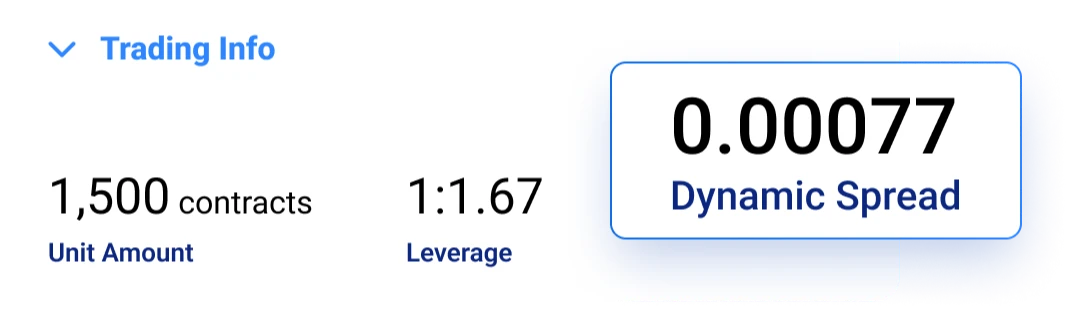
Global Trade's service fees are mainly derived from the spread between the buy (offer) and sell (bid) prices (click here for details); therefore, when you open a position, you have already "paid" the spread. This spread is included in Global Trade's quotes and is not an additional charge or fee required beyond the quoted price.
To view the spread for a specific instrument, simply:
- Log in to your account.
- Search for the specific instrument.
- Select the details icon (i) and scroll down to the Trading Information section.

Additional Fees
Depending on your trading activity, your account may be subject to the following fees:
Overnight Fees
If you hold a position after a certain time (referred to as the "overnight fee time"), your account will be credited or debited with an overnight fee. You can learn more about this here.
Currency Conversion Fees
For all trades on financial instruments denominated in a currency different from your account currency, Global Trade will charge a currency conversion fee. The currency conversion fee will be reflected immediately in the unrealized profit/loss of open positions. You can read more about this here.
Guaranteed Stop-Loss Orders (GSLO)
This is a special order that helps you manage risk by guaranteeing a stop-loss price. If you choose to use this feature, please note that this order guarantees closure at a specified price, so it has a wider spread. You can learn more about this here.
Inactivity Fees
If you do not log in to your trading account for at least three months, a fee of up to USD 10 per month will be charged. From that point onward, this fee will be charged once per month for each month you do not log in to the account.
Deposits and Withdrawals
We Charge No Fees for Deposits and Withdrawals!
We are committed to providing the best trading conditions and cover most payment processing fees. In very rare cases, you may incur fees when transferring funds to or from your Global Trade1 account. The fee structure is determined and charged by your payment issuer or bank (not Global Trade).
1 For example, international credit/debit card transactions, bank account transfers, and transactions conducted in unsupported currencies (foreign currency conversion).
Frequently Asked Questions
Global Trade is completely free of any hidden fees. Global Trade primarily profits through spreads. For more information, please refer to: "Do you charge any trading fees?"
We are committed to providing the best trading conditions and cover most
payment processing fees.
In very rare cases, you may be responsible for fees when depositing or
withdrawing funds from your Global Trade account. These fees are determined
and
charged by your payment issuer or bank (not by Global Trade).
Third parties may charge fees to your account in the following
situations:
- International Credit Cards - When transactions are processed through a foreign (non-local) acquirer.
- Bank Account Transfers In/Out - When transferring funds from your account to Global Trade, or from Global Trade to your account.
- Foreign Currency Conversion - When the selected payment method does not support the currency you wish to deposit.
Global Trade's primary source of revenue for the services it provides is through "market spreads". For example, when a customer trades EUR/USD forex, the buy price might be 1.3128 while the sell price is 1.3126 (in this example, the market spread is 2 pips). Other service providers may charge additional commissions per trade; a key difference with Global Trade is that it is completely commission-free.
However, under specific circumstances, the following additional fees may apply:
Overnight Funding - When a position is held open past a
certain time ("Overnight Funding Time"), a credit or debit is applied to
your account.
The Overnight Funding Time and the daily overnight funding percentage can be
viewed via the "Details" link next to the instrument name on the
platform's main page.
Currency Conversion Fee - For all trades on instruments
denominated in a currency different from your account's currency,
Global Trade
charges a currency conversion fee.
The current currency conversion fee is up to 0.7% of the trade's realized
profit/loss and is reflected in real-time in the unrealized profit/loss of
open positions.
Inactivity Fee -
If you do not log into your trading account for at least three months, a fee
of up to $10 per month will be charged. Starting from that point, this fee
will be charged monthly for each subsequent month without a login. The
inactivity fee will be equal to the remaining available balance in your
account or $10 (or equivalent in account currency), whichever is lower.
Please note, this fee is only deducted from real money accounts and only
when there are sufficient funds. To avoid this fee, simply log into your
account periodically within any three-month period; logging in is considered
account activity that resets the inactivity period.
Guaranteed Stop Order - This feature ensures your position (trade) is closed at a predetermined price level you set, but typically comes with a wider spread for such trades. For more details, please read the FAQ section on "Trading" → "What is a Guaranteed Stop Order"
* For further information regarding fees, please consult our User Agreement.
Overnight funding is credited or debited to your account when a position remains open after a specific cut-off time (the "Overnight Funding Time").
The formula for calculating the daily overnight funding is:
Trade Size * Opening Price * Point Value * Daily Overnight Funding Percentage
When trading stock CFDs, the formula is: Trade Size * Daily Closing Price * Point Value * Daily Overnight Funding Percentage, where the Daily Closing Price is the average of the last quote [(Buy + Sell)/2] 30 minutes before the Overnight Funding Time (e.g., if the Overnight Funding Time is 22:00, we use the last quote at or before 21:30).
The Overnight Funding Time and the daily overnight funding percentage can be viewed via the "Details" link next to the instrument name on the trading platform's main page. For more information about charges, please read "Do you charge any trading fees?"